Rent collection AI Voice, SMS & email

Recover Rent Faster with AI-Powered Outreach

Smart Rent Collection follows up on overdue rent across voice, SMS, and email, reads what the tenant actually said, and routes the cases that need a person on your team.

  • Human oversight
  • Configurable guardrails
  • Complete audit history

A real conversation

The agent opens with a required identity and recording disclosure, states the balance, and asks how the resident intends to resolve it.

The account behind it

Watch the lease profile, ledger, and pending collections the agent is reading from while the call runs.

The result your team reviews

A structured outcome - commitment, amount, date, and next action - with every financial decision left to a person.

Outstanding Collections screen. An Outstanding Balance Allocation row shows Total Outstanding of $9,293 across 10 cases, equal to the sum of Active Outreach, Unreachable Balance, Payment Commitments, Disputed Balance, Settlement Balance, and Escalation, with a Reconciled to total badge. Below, a work queue lists each lease with its total unpaid and aging, collection status, updates, the recovery blocker under Issues, the required next step, and the assignee.

Try it yourself Voice agent simulation

Run the Demo
See a Collection Call End to End

Enter a mobile number and walk through a complete collection call - the lease profile and ledger the agent reads from, the conversation as it unfolds, and the structured result your team reviews afterward.

  1. Enter number - current step
  2. Agent calls
  3. Account Details
  4. Call result

Try the voice agent

Enter a mobile number and the agent will place a demonstration collection call, working from the sample lease shown in the next step.

Mobile numbers only. Standard carrier rates may apply.

Works with Propertyware and Buildium, or a spreadsheet import - your property system stays the source of truth.

  • Propertyware API sync and report import
  • Buildium API sync
  • Spreadsheet import Excel / CSV, with preview
PROPERTYMANAGERS MULTIFAMILYOPERATORS PORTFOLIOLEADERS ACCOUNTSRECEIVABLE

Only integrations supported today are listed. Additional property systems are not currently available.

Platform One coordinated process

Human-Like Follow-Up
on Every Overdue Balance

All three channels share the same account context, outreach rules, and conversation history - so a tenant never gets contradictory messages, and your team sees one continuous record.

AI voice conversations

Natural payment-reminder calls that capture the tenant's response and route cases needing a person. Calls open with a configurable AI and call-recording disclosure.

Smart SMS follow-ups

Timely messages and two-way replies connected to the tenant's collection history. Opt-out requests are honored automatically.

Consistent email outreach

Clear account reminders with a reliable communication record. Inbound replies are parsed and attached to the right lease.

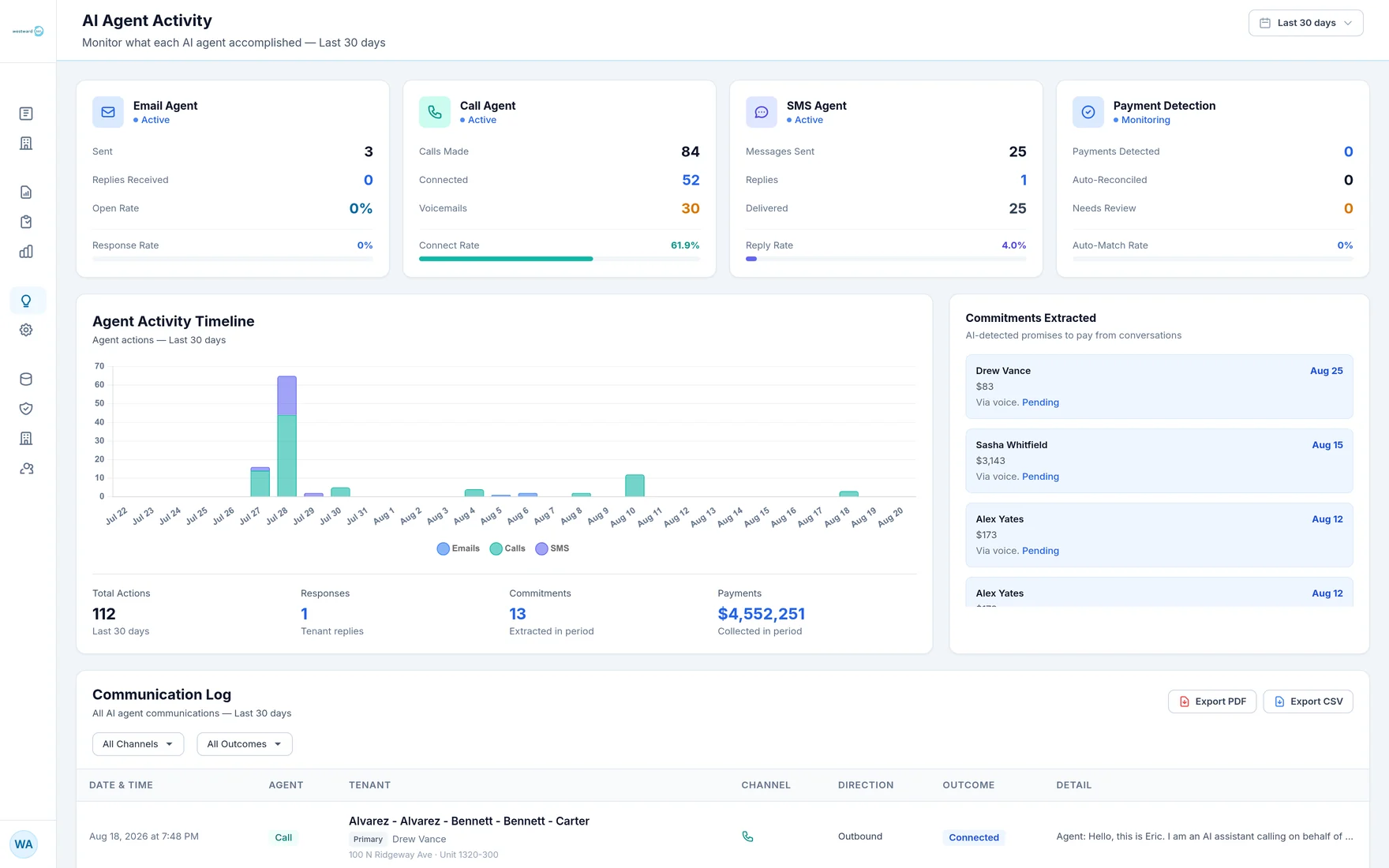
AI Agent Activity screen showing four agent cards - Email Agent, Call Agent, SMS Agent, and Payment Detection - each with per-channel metrics such as calls made, connected, voicemails, and connect rate. An agent activity timeline charts emails, calls, and SMS by day, alongside extracted payment commitments and a communication log listing date, agent, tenant, channel, direction, and outcome for every message.
Per-channel activity and one communication log across voice, SMS, and email.

Benefits Built for collections teams

Why Property Teams
Choose Smart Rent Collection

Six things collections teams tell us actually move the work forward.

1. Multichannel outreach

Voice, SMS, and email coordinated by one orchestrator with a shared account context.

2. Configurable schedules

Contact hours, per-channel frequency limits, minimum gaps, and cooling periods after a live call.

3. Response identification

Replies are read for intent - promise to pay, dispute, hardship, wrong number, or a request for a person.

4. Payment-promise tracking

Promised amounts and dates captured from conversations, including conditional promises and installment plans.

5. Dispute routing

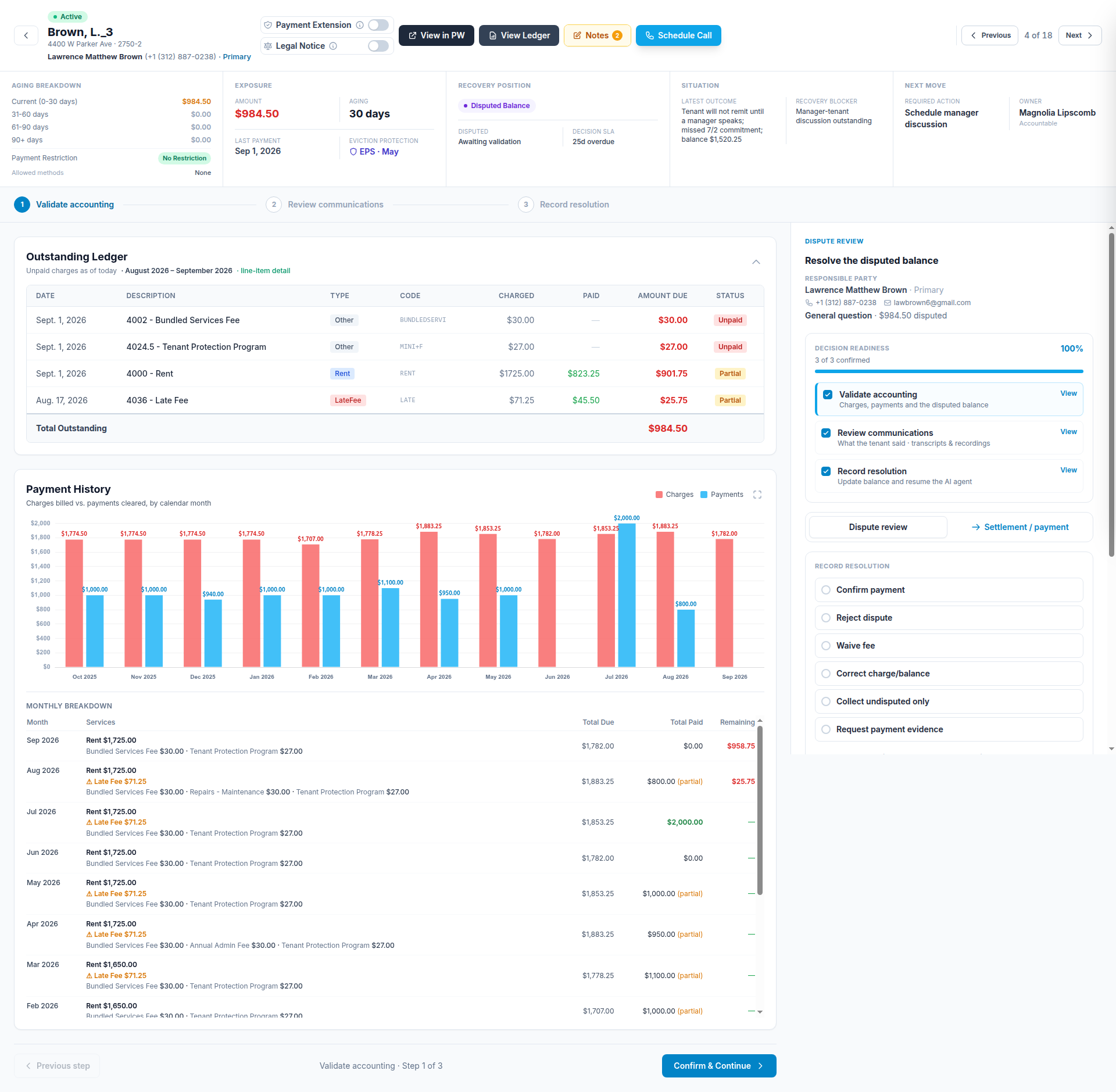
Disputes are itemized with a reason, amount, and evidence state, then routed with a review checklist and SLA.

6. Reconciliation monitoring

Daily comparison against your property system; balance mismatches are flagged, paused, and escalated.

AI Collections Dashboard showing six metric cards: Unpaid Tenants, Total Outstanding, AI Contacts Made, Commitments Received, Paid This Month, and Collection Rate. Status filters cover all unpaid, no contact, contacted, committed, escalated, legal or notice, paid, excluded, and payment extension. A table below lists each lease with its tenants, balance and days late, AI activity counts, commitment date, and a conversation summary.
Portfolio overview with status filters and per-lease conversation summaries.

Centralized history

Every call, message, and email on one timeline, with recordings and transcripts.

Role-based access

Admin, manager, and staff roles, with per-property assignment.

How it works From data to resolution

From Account Data
to the Right Next Action

A controlled workflow keeps outreach consistent and brings exceptions to the right person.

  1. Connect account data

    Synchronize lease, tenant, balance, payment, contact, and account-status information from your property management system.

  2. Apply your rules

    Respect exclusions, legal holds, payment restrictions, schedules, and per-channel communication limits before anything is sent.

  3. Coordinate outreach

    Engage tenants through approved voice, SMS, and email workflows that share one account context.

  4. Review and resolve

    See commitments, disputes, unreachable accounts, and the cases that require your team's attention.

Every outstanding balance lands in exactly one position

Reconciles to the total

Because each lease is assigned to a single position, the six categories always add up to your total outstanding balance - nothing double-counted, nothing unaccounted for.

01

Active outreach

Engaged; outreach in progress

02

Unreachable

No meaningful two-way contact

03

Payment commitments

Tenant promised a payment

04

Disputed

Charges disputed by the resident

05

Settlement

Negotiated plan or waiver in progress

06

Escalation

Routed for legal or manual review

Human in command Automation with oversight

Automation That Knows
When to Step Back

Smart Rent Collection handles approved communication tasks. Your team remains responsible for financial, legal, and policy decisions - and every boundary is enforced by the system, not left to the model's discretion.

  • Pause outreach at the property, unit, lease, or account level
  • Route sensitive cases and requests for human assistance
  • Require approval before restricted actions can proceed
  • Review every decision with a complete audit trail
  • Guardrails hold - rules apply on top of the prompt, so they can't be edited away
How guardrails are enforced

Guardrail rules are managed one at a time - each with its own wording, channel, and severity - and can be switched off without losing the text.

Enabled rules are appended after the configured prompt when the agent's instructions are assembled. Editing a prompt therefore cannot remove a guardrail.

Before any contact is attempted, the system independently checks opt-out status, allowed contact hours in the tenant's local time, per-channel frequency limits, minimum interval between contacts, state-specific rules, lease status, active legal cases, cease-and-desist requests, dispute state, and recording-consent requirements.

ACCOUNT REVIEW

ALL CONTROLS PASSED

Outreach controls

Legal hold Blocks all outreach
Contact window 8:00 AM – 9:00 PM tenant local
Human approval Required for restricted actions
Account eligible for outreach Opt-out, hours, frequency, legal hold - all passed

Outcomes A clearer workflow

Less Chasing, More Resolving

Give your team a consolidated view of every account and the context to focus on what needs human judgment.

01

Reduce repetitive work

Approved automation handles routine reminders across every channel, on your schedule.

02

Spot important cases sooner

Disputes, hardship, and requests for a person surface as soon as they're mentioned.

03

See the whole story

Calls, texts, emails, promises, and account activity on one timeline per lease.

Placeholder - awaiting client approval

Customer quotes, logos, and performance metrics will appear here once verified figures and written permission are supplied. No statistics are shown until then.

Responsible by design Security and oversight

Every Action Is Attributable

Collections work touches financial and personal information. These are the controls the platform implements today.

Role-based access

Admin, manager, and staff roles with per-property assignment.

Audit history

Changes record the actor, including actions taken on a client's behalf.

Organization separation

Data is scoped per organization at the query layer, not just the interface.

Human oversight

Restricted actions are gated behind approval by an authorized person.

AI & recording disclosure

Calls can announce the AI caller and that the call is recorded. Both on by default.

Consent & opt-out

Per-channel opt-out and cease-and-desist requests stop outreach for that contact.

Communication logs

Every outbound and inbound message is recorded and attributable.

Exception handling

Data mismatches and failures pause outreach and raise a case instead of proceeding.

The assistant does not waive fees, approve settlements, give legal advice, initiate eviction, or change financial records. Those actions require an authorized person on your team.

FAQs Questions & answers

Frequently Asked Questions

What property teams ask most often before getting started.

Which property management systems do you support?
Propertyware and Buildium today, via API sync. Propertyware also supports report import. If you use another system, you can bring data in through an Excel or CSV upload with a preview step before anything is imported. Your property system remains the source of truth - we do not write back to it.
Does the AI ever make a financial or legal decision?
No. The assistant handles approved communication tasks only. It does not waive fees, approve settlements, give legal advice, initiate eviction, or modify financial records. Actions that need authorization are routed to a person, and escalation rules decide what requires approval before anything proceeds.
How do you keep outreach within legal contact limits?
Before any contact is attempted, the system independently checks opt-out status, allowed contact hours in the tenant's local time, per-channel frequency limits, the minimum interval between contacts, state-specific rules, lease status, active legal cases, cease-and-desist requests, dispute state, and recording-consent requirements. Defaults reference published federal and state standards and are configurable per organization.
Can we pause outreach for a specific property or tenant?
Yes - at the property, unit, lease, or account level. You can also exclude sensitive or legally restricted accounts entirely, and per-channel opt-outs are honored automatically when a tenant asks to stop being contacted.
What happens when a tenant disputes a balance?
The dispute is itemized with a reason, amount, and evidence state, then routed with a review checklist and an SLA. Balance mismatches found during the daily reconciliation against your property system are paused and escalated rather than contacted.
Do tenants know they are speaking with an AI?
Calls can open with a configurable disclosure that the caller is an AI assistant and that the call is being recorded. Both disclosures are enabled by default.

Get started AI voice, SMS, and email outreach

Ready to Make Rent Follow-Up More Consistent?

See how coordinated AI outreach can support your property management team. A specialist will walk through the product using your portfolio's structure.

Get Started

We'll reply within one business day.

We use your details only to arrange the demo.

Or talk to our team →